Modern cardiology clinics need structured Abbott Merlin.net workflows that fit smoothly into multi-OEM device operations.
1. Rapid Patient Enrollment via SyncUp Technology Complete enrollment within 2 weeks post-implant with full myMerlin setup and a confirmed test transmission.
2. Customized Alert Management in Merlin.net Configure tiered alert thresholds that reduce noise and keep VT/VF episodes and battery indicators at the top of the queue.
3. Standardized Follow-up Schedules Use quarterly interrogations per 2025 AHA/ACC/HRS guidelines and add monthly monitoring for high-risk patients.
4. myMerlin App Patient Education Aim for more than 90% compliance with structured onboarding, clear instructions, and ongoing support.
5. Defined Staff Roles and Training Assign specific responsibilities to technicians, nurses, physicians, and administrators to avoid bottlenecks.
6. Seamless EHR Integration Automate data flow between Merlin.net and the EHR to remove manual entry and reduce errors.
7. CPT Code Billing Optimization Capture CPT 93298/93299 revenue with compliant documentation and automated billing workflows.
8. Performance KPI Tracking Monitor response times, compliance, and revenue to confirm that the program stays effective.
Days Post-Implant | Monitoring Action | Compliance Target |
1-30 | In-office visit plus remote setup | 100% enrollment |
30-90 | Monthly remote checks | >95% transmission |
90+ | Quarterly monitoring | >90% compliance |
SyncUp supports smooth patient onboarding when clinics follow a consistent process. Start enrollment during the implant procedure by downloading the myMerlin app and pairing the device. Run a test transmission within 24 hours to confirm connectivity and fix Bluetooth or network issues early. Teach patients how to place the transmitter, manage charging, and handle common connection problems.
Key enrollment steps include obtaining informed consent for remote monitoring, setting patient preferences in Merlin.net, scheduling the first remote transmission, and documenting enrollment completion for billing.
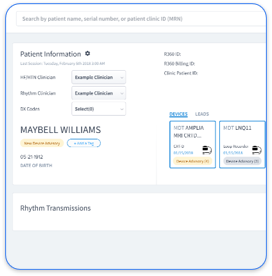
Schedule a demo to see how Rhythm360 unifies Abbott SyncUp data with multi-OEM devices using AI-powered normalization, so staff avoid separate enrollment workflows for each manufacturer.

Alert fatigue remains one of the main barriers to effective Abbott remote monitoring. The 2026 HRS Expert Consensus highlights the value of advanced algorithms that detect early risk while limiting unnecessary notifications.
Alert Type | Threshold Setting | Response Timeline | Action Required |
VT/VF Episodes | Any occurrence | Immediate | Same-day review |
Atrial High Rate | >24 hours | Within 48 hours | Clinical assessment |
Battery ERI | Low indicator | Same day | Schedule replacement |
Mode Switch | Frequent episodes | Within 3 days | Programming review |
Configure Merlin.net so that actionable alerts stand out and routine transmissions stay in the background. Rhythm360’s single dashboard brings Abbott alerts together with other OEM notifications and uses AI alert triage to shorten response times for critical events by up to 80%.
Strong patient compliance supports clinical outcomes and protects billing eligibility. Run 90-day compliance checks to spot transmission gaps early and intervene before patterns form. Teach patients how to maintain Bluetooth connections, position transmitters correctly, and manage device batteries to avoid technical failures.
Effective compliance tactics include automated reminders for missed transmissions, simple troubleshooting guides, scheduled check-ins during the first three months, and clear explanations of why consistent monitoring matters. Rhythm360 improves compliance with integrated Twilio messaging that reaches out automatically after missed transmissions and helps clinics sustain participation rates above 90%.
Defined roles and targeted training keep Abbott's remote monitoring workflows efficient. Assign device technicians, registered nurses, physicians, and administrators specific duties so that no task falls through the cracks and patients receive consistent care.
Role | Primary Duties | Training Requirements | Rhythm360 Benefit |
Device Technician | Alert triage and routine reviews | Abbott certification | Unified multi-OEM dashboard |
RN Care Coordinator | Patient education and follow-up | Remote monitoring protocols | Automated patient communications |
Physician | Clinical decisions and programming | Advanced interpretation skills | Mobile app for on-call access |
Administrator | Billing and compliance tracking | CPT code requirements | Automated billing documentation |
Rhythm360 reduces dependence on a few super-users by offering intuitive interfaces that support cross-training and flexible coverage across the team.
Reliable revenue growth depends on automatic capture of billable remote monitoring events. The 2024 JACC analysis reports 180% to 250% revenue increases when clinics use CPT codes correctly. Abbott remote monitoring supports CPT 93298 for initial setup and education and 93299 for ongoing monitoring and interpretation.
Core implementation steps include building documentation templates, defining billing workflows for each monthly monitoring period, training staff on CMS rules, and running quality checks on claims. Practices achieve net gains of $250 per patient annually with refined billing processes.
Schedule a demo to see how Rhythm360 automates CPT capture and generates compliant documentation that supports maximum revenue recovery.
Abbott Merlin.net remote programming allows efficient care without routine office visits. Create clear protocols for remote parameter changes, medication adjustments based on device data, and coordination with other specialists who rely on the same information.
Secure mobile access lets clinicians respond quickly to critical alerts from any location. Rhythm360 offers bi-directional Epic and Cerner integration with more than 99.9% data capture reliability, so teams can manage all device manufacturers from a single mobile-friendly platform.
Multi-OEM device fleets introduce complexity that single-vendor tools cannot solve. Clinics that manage Abbott pacemakers alongside Medtronic and Boston Scientific devices often juggle fragmented workflows, duplicate administrative work, and higher risk of missed critical events.
Rhythm360 addresses these issues with a cloud dashboard that aggregates all OEM data, AI alert triage, a secure mobile app for on-call access, and Twilio-powered automated patient outreach. One case study shows the impact clearly. A Saturday morning atrial fibrillation alert passed through Rhythm360 AI triage, triggered same-day anticoagulation, and likely prevented a stroke that might have been overlooked in separate OEM portals.
Leading cardiology groups use Rhythm360 to strengthen Abbott remote monitoring while managing every device type on one intelligent platform. Clinics report up to 80% faster response times and as much as 300% revenue growth through streamlined workflows and complete billing capture.
Schedule a demo to upgrade your Abbott pacemaker program with a vendor-neutral approach.
Successful Abbott remote monitoring programs rely on consistent tracking of clinical and financial performance. Set baseline metrics before rollout and review progress each month to confirm that changes deliver results.
Key Performance Indicator | Target Benchmark | Measurement Frequency |
Alert Response Time | <2 hours for critical events | Daily |
Patient Compliance Rate | >90% transmission | Weekly |
Revenue per Patient | Up to 300% increase vs baseline | Monthly |
Office Visit Reduction | 45-60% decrease | Quarterly |
Rhythm360 supplies real-time KPI dashboards that track these metrics automatically and support data-driven decisions about staffing, workflows, and investments.
Rhythm360 functions as a vendor-neutral platform that ingests data from Abbott Merlin.net, Medtronic CareLink, Boston Scientific, and other OEM portals through API connections, HL7 integration, and computer vision. The platform converts different data formats into a single dashboard, so staff avoid logging into multiple systems while preserving complete data fidelity across all device types.
Abbott pacemaker remote monitoring supports CPT codes 93298 for initial setup and education and 93299 for remote monitoring with physician interpretation. Clinics must document patient enrollment, maintain monthly monitoring periods with at least 30 days of data, record physician interpretation and reporting, and meet CMS documentation rules. Rhythm360 automates these steps, generates required documentation, and tracks billing periods to support full revenue capture.
Clinics reduce alert fatigue by using tiered alert protocols that elevate critical events and filter routine transmissions. Configure Merlin.net to flag VT/VF episodes and battery indicators immediately and assign longer review windows for non-urgent events such as mode switches. The 2026 HRS guidelines highlight AI triage systems that cut non-actionable alerts by up to 55% while maintaining safety through intelligent prioritization.
Well-structured myMerlin programs often reach compliance rates above 90% when paired with strong education, automated reminders, and proactive troubleshooting. Success depends on thorough setup during implant, clear transmitter instructions, regular compliance checks with early outreach after missed transmissions, and ongoing technical support for connectivity issues.
The 2026 HRS updates call for mandatory quarterly remote interrogations for all Abbott pacemakers and monthly monitoring for high-risk patients during the first three months post-implant. The guidelines also encourage vendor-neutral platforms that combine multi-OEM workflows, AI alert triage to limit fatigue, and standardized response timelines with same-day action for critical events and 48-hour review for atrial high-rate episodes longer than 24 hours.
These eight best practices create a strong foundation for Abbott pacemaker remote monitoring programs that support better outcomes and stronger financial performance. Rhythm360 extends these gains by unifying Abbott monitoring with multi-OEM management, AI-driven efficiency, and automated revenue workflows.
Schedule a Rhythm360 demo to put these best practices in place while modernizing your entire cardiac device monitoring operation.