
Mobile Access Cardiac Device Transmissions: An Ops Guide
Manage mobile CIED transmissions with confidence. Rhythm360 helps cardiology practices unify mobile & bedside monitoring workflows. Get started!

Key Takeaways
- Mobile access to cardiac device transmissions uses a smartphone app instead of a bedside monitor to relay data from implanted devices to manufacturer networks for clinic review.
- Support for mobile transmissions varies by manufacturer. Medtronic offers the most documented pathway via the MyCareLink Heart app, while Abbott, Boston Scientific, and Biotronik have more limited or device-specific mobile options.
- Smartphone-based transmissions follow the same four-step data pathway as bedside monitors. They introduce new failure points related to Bluetooth pairing, cellular or Wi-Fi connectivity, and manufacturer server availability.
- Traveling patients face additional transmission risks including frequency band incompatibility, roaming restrictions, and coverage gaps that can disrupt mobile monitoring workflows.
- Rhythm360 unifies mobile and bedside transmissions across multiple manufacturers into a single vendor-neutral platform, improving workflow efficiency, billing compliance, and alert response times.
See How Rhythm360 Unifies Mixed-Device Monitoring
Manufacturer Mobile Support For Cardiac Device Transmissions
Mobile support varies meaningfully by manufacturer and device generation. The table below summarizes the current state for each major platform.
Manufacturer Mobile App / Tool Bedside Monitor Required? Compatible Devices Medtronic MyCareLink Heart app No for Bluetooth-enabled devices, yes for older ICD/CRT-D Azure pacemakers, newer ICD/CRT-D, LINQ II ICM Abbott Merlin.net platform Depends on device compatibility Verify specific models with Abbott, no published Bluetooth app pathway Boston Scientific MyLATITUDE Patient App (compliance notifications); LATITUDE NXT Communicator for data Yes, LATITUDE NXT Communicator for most rhythm devices Pacemakers, ICDs, CRT devices, insertable cardiac monitors using LATITUDE NXT Communicator Biotronik Home Monitoring platform Depends on device generation Confirm model-level support with Biotronik, mobile pathway varies by generation
The table shows that mobile support is uneven across manufacturers. Medtronic offers the most documented mobile pathway, so it deserves a closer look first. The MyCareLink Heart mobile app supports Bluetooth-enabled devices, including Azure pacemakers, newer ICD/CRT-D models, and the LINQ II ICM. Patients can transmit via cellular or Wi-Fi without a bedside monitor. The LINQ II uses Bluetooth with end-to-end encryption to send data from the implanted device to the app, which relays it to the CareLink network. Older ICD/CRT-D devices require the MyCareLink Patient Monitor, a cellular-based bedside unit and the only remote monitoring option for that device population. The MyCareLink Relay Home Communicator serves as a bedside alternative for Bluetooth-enabled devices and automatically defaults to cellular if Wi-Fi is unavailable.
Abbott’s Merlin.net platform supports remote monitoring for compatible implanted devices. Practices should verify device-level compatibility directly with Abbott before they rely on mobile-only transmission for any patient.
Boston Scientific’s LATITUDE NXT system pairs with a dedicated communicator rather than a patient smartphone app for most implanted rhythm devices. It provides automatic and daily monitoring between scheduled appointments. The MyLATITUDE Patient App is designed to improve compliance by notifying patients when their LATITUDE NXT Communicator is not connected and guiding them on reconnection. It functions as a compliance tool rather than a primary transmission pathway.
Biotronik’s Home Monitoring platform transmits data from compatible implanted devices to the clinic. Transmission pathway and mobile support depend on the specific device generation. Practices should confirm compatibility with Biotronik before they configure a mobile-only workflow.
How Smartphone Apps Send Pacemaker Or ICD Data To The Clinic
Newer-generation pacemakers use Bluetooth Low Energy (BLE) to communicate directly with an app on a smartphone or tablet, which pairs with the implanted device, collects the data, and uploads it through the phone’s internet connection. When a smartphone app replaces a bedside monitor, it performs the same functional role as a home transmitter. The data pathway stays the same, while only the patient-side hardware changes.
Setup steps vary by manufacturer. For Medtronic’s MyCareLink Heart app, patients must confirm their smartphone is on the MCLHeart.com compatibility list, ensure the phone is connected to Wi-Fi or cellular service, keep the app running in the background or foreground, and keep the mobile device and software current.
When a mobile transmission fails, the cause typically falls into one of three layers. The first layer is the wearable-to-phone link, which covers Bluetooth pairing. The second layer is the phone-to-network link, which covers cellular or Wi-Fi connectivity. The third layer is the network-to-platform link, which covers manufacturer server availability. Medtronic notes that CareLink Network availability may be unavailable at times due to maintenance or updates, or because coverage is unavailable in the user’s area. Device compatibility must be verified before a clinic relies on mobile-only transmission, because not all implanted devices support Bluetooth-based app pairing.
Managing CIED Transmissions When Patients Travel
Mobile access offers a portability advantage over bedside monitors because patients carry their smartphone rather than additional hardware. Transmission reliability while traveling still depends on factors outside the implanted device itself.
Medtronic specifies that CareLink and MyCareLink Patient Monitors are intended for use within the prescribing country, while MyCareLink Smart Patient Monitors may be used internationally, subject to standard mobile device availability and rates. This guidance is product-specific. Cross-border instructions from Medtronic do not apply uniformly across its entire monitor lineup.
Several failure modes emerge when patients cross borders:
- Frequency band incompatibility: Common LTE bands differ by region, such as Europe using B1, B3, B7, and B20, while North America uses B2, B4, B12, B13, and B66. A device or SIM optimized for one region may perform poorly or inconsistently in another.
- Roaming restrictions: Standard cellular roaming introduces latency penalties, cost unpredictability, session instability, and in some countries regulatory restrictions that limit or prohibit roaming for certain device categories.
- Data sovereignty requirements: Data sovereignty laws in certain countries require data generated within their borders to be stored or processed locally, which affects how device data can be routed and managed.
- Permanent roaming restrictions: Some mobile operators impose permanent roaming restrictions on long-term usage to prevent networks from being used indefinitely by subscribers who never become local customers. These restrictions may only surface months after a deployment appeared stable.
Before departure, the most important step is confirming the specific monitor model’s international use status with the manufacturer, because cross-border support varies by product. Patients should then verify that their smartphone’s cellular plan includes data roaming in the destination country, since the phone cannot relay data without it even when the monitor is approved abroad. Carrying the device identification card also helps at airport security, where implanted cardiac devices often trigger screening. Patients using monitors restricted to the prescribing country should discuss alternative transmission arrangements with their clinic before extended international travel.
Troubleshooting Cardiac Device Transmissions That Fail On Mobile
Mobile-specific transmission failures usually involve the patient’s personal device and its software environment. As Philips notes in its MCOT product labeling, “connected does not mean continuous data transmission” and data receipt and processing may be impacted by cellular, Bluetooth connection, and wireless transmission factors. The most efficient approach treats troubleshooting as three separate layers.
Layer 1 — Wearable-to-Phone Link (Bluetooth Pairing): Start with the Bluetooth link, since it is the most common failure point. Confirm Bluetooth is enabled on the patient’s smartphone and the app has Bluetooth permissions granted in the device’s operating system settings. If those settings look correct, verify that the phone model appears on the manufacturer’s compatibility list and that the phone is within the required proximity of the implanted device. App updates that have not been installed can also break pairing on previously working configurations.
Layer 2 — Phone-to-Network Link (Cellular Or Wi-Fi): Move next to the internet connection, because a paired device still cannot upload without it. Confirm the phone has an active cellular data or Wi-Fi connection. Medtronic states that mobile device access to the internet is required and subject to coverage availability. Patients in rural areas, basements, or traveling internationally may experience coverage gaps that prevent upload even when Bluetooth pairing is successful.
Layer 3 — Network-to-Platform Link (Manufacturer Server): If the first two layers are functioning, the failure likely involves manufacturer server availability. Medtronic acknowledges that CareLink Network availability may be unavailable at times due to maintenance or updates. In these cases, the transmission typically retries automatically once connectivity is restored.
For bedside monitors, Medtronic advises that when the MyCareLink Monitor displays an error with cellular signal bars, the cause is typically inadequate cellular signal, and the recommended fix is changing the monitor’s orientation or relocating it near a window or outside wall. A system error screen is addressed by restarting the monitor. Bedside monitor failures therefore tend to be hardware-environment problems, which follow a different diagnostic path than the software and compatibility failures that characterize mobile app issues.
Get Help Triaging Mobile Transmission Failures
Billing And Compliance Implications Of Mobile Transmissions
Once transmissions are flowing reliably, the next operational question concerns reimbursement. The transmission pathway, whether mobile app or bedside monitor, does not change which CPT codes apply. Device type, monitoring interval, and documentation completeness determine billing eligibility.
For pacemakers and ICDs on a 90-day cycle, the applicable codes are 93294 (pacemaker professional), 93295 (ICD professional), and 93296 (pacemaker or ICD technical). These codes are device-type specific and do not interchange with the 30-day codes used for other device categories.
For physiologic monitors and loop recorders on a 30-day cycle, two device-specific codes apply:
- CPT 93297 covers remote interrogation of an implantable cardiovascular physiologic monitor, such as a pulmonary artery pressure sensor used in heart failure management. It is reportable once per completed 30-day monitoring period and can be billed global, with modifier -26 for the professional review, or with modifier -TC for data collection and equipment.
- CPT 93298 covers remote interrogation of a subcutaneous cardiac rhythm monitor or implantable loop recorder. It applies to devices such as the Medtronic LINQ II, Abbott Assert-IQ, Boston Scientific LUX-Dx, and Biotronik BIOMONITOR, is billable once per 30-day period, and can be billed globally or split with modifier -26 (professional review) or -TC (data collection or equipment) when different entities perform each component.
These two codes function as device-specific codes for different implant categories rather than a professional and technical pair. Applying 93297 to a loop recorder or 93298 to a physiologic monitor creates a coding error and a common denial trigger.
CPT 99454 applies to remote physiologic monitoring device supply and covers the monthly supply of an RPM device and automated data transmission. It requires at least 16 days of data transmission within a 30-day billing cycle, the device must meet FDA’s definition of a medical device, and data must be automatically transmitted because manual uploads do not qualify.
Documentation requirements apply regardless of whether the transmission arrived via mobile app or bedside monitor. For CPT 93298, a compliant claim requires a signed and dated physician interpretation, along with proof of a completed remote transmission with a timestamp, documentation that the monitoring period ran the full 30 days, and review of recorded rhythm data. The same documentation discipline applies to 93297 and 99454 claims.
As one practice administrator noted after implementing Rhythm360, “We have improved billing and accountability for our patients after the integration.”
When Mobile Access Is Enough And When A Vendor-Neutral Platform Helps
Mobile access is operationally sufficient when a patient has a single manufacturer’s Bluetooth-enabled device, owns a compatible smartphone, maintains reliable cellular or Wi-Fi connectivity, and the practice manages a homogeneous device population within a single manufacturer’s portal. In these circumstances, the manufacturer’s app handles transmission without additional infrastructure.
Mobile access creates operational gaps when any of the following conditions apply:
- The practice manages patients across Medtronic, Abbott, Boston Scientific, and Biotronik devices, which requires staff to log into multiple non-interoperable portals.
- Patients have older device generations that require a bedside monitor, which creates a mixed transmission environment within the same practice.
- Traveling patients miss transmissions due to roaming restrictions, band incompatibility, or coverage gaps.
- Mobile transmission failures go undetected because no single system monitors connectivity across all manufacturer pathways.
- Billing documentation is assembled manually from multiple portal reports, which increases the risk of unsigned reports, missed 30-day intervals, and device-type mismatch denials.
Rhythm360, developed by RhythmScience, is a vendor-neutral, HIPAA-compliant, cloud-based platform. It unifies mobile and bedside transmissions from Medtronic, Boston Scientific, Abbott, Biotronik, and others into a single source of truth. Its secure mobile app allows clinicians to review transmissions, sign reports, and coordinate care from anywhere, a capability that Andrew Beaser, MD, at the University of Chicago Medicine described directly: “I am more likely to sign off on these while in meetings because I can easily access them on my phone.” UCM reviewed more than 73,000 reports annually through Rhythm360 in calendar year 2025, averaging more than 18,000 reports per quarter.
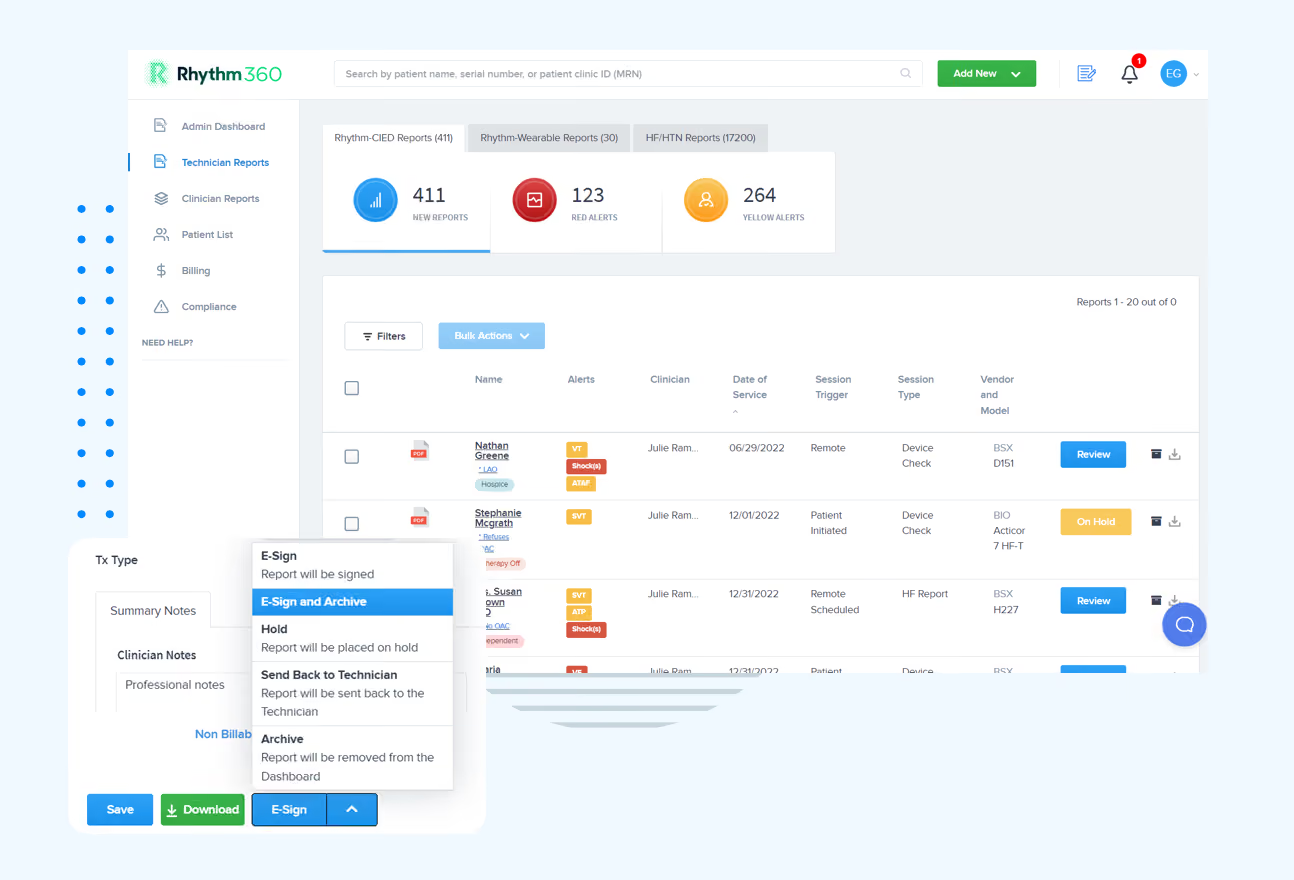
Because the platform is built to fit existing workflows, Rhythm360 offers bi-directional EHR integration with Epic, Cerner, Athenahealth, eClinicalWorks, and Greenway Health. Onboarding typically takes only a few days to a few weeks. That integration supports the platform’s AI-powered infrastructure, which achieves greater than 99.9% transmissibility through redundant data feeds, computer vision, and AI-powered extrapolation. The result is faster alert response, up to 80 percent faster, and revenue capture improvements of as much as 300 percent.
If your practice is evaluating vendor-neutral options, the CIED monitoring space includes several platforms beyond the manufacturer portals, with Murj, Implicity, Rhythm Management Group, and Octagos among them. The deciding factor usually involves how well a platform handles your specific mixed-device population and integrates with your existing EHR environment.
Talk To Us About Your Device Population
Frequently Asked Questions About Mobile CIED Workflows
How Should A Practice Triage Missed Mobile Transmissions?
Start by checking whether the patient ever transmitted successfully. If they have never connected, treat the issue as setup and confirm device compatibility, app installation, and Bluetooth permissions. If transmissions were previously successful and then stopped, work through the three troubleshooting layers in order, from Bluetooth link to phone connectivity to manufacturer server status. Practices should also flag which patients use mobile-only pathways versus bedside monitors so staff can route missed alerts to the right workflow.
When Does A Patient Still Need A Bedside Monitor?
Patients with older device generations that lack Bluetooth support still require a bedside monitor. Many Boston Scientific rhythm implants also continue to rely on the LATITUDE NXT Communicator as the primary transmission pathway. Mixed-device practices almost always maintain a pool of bedside monitors for these populations, even when mobile apps work well for newer implants.
How Does Travel Change Mobile Monitoring Risk?
Travel introduces additional variables such as roaming rules, regional frequency bands, and local coverage quality. Clinics should maintain a simple travel checklist that covers monitor eligibility outside the prescribing country, the patient’s roaming plan, and expectations for missed transmissions. A documented protocol helps on-call staff respond consistently when a scheduled transmission fails while a patient is abroad.
Do Mobile Transmissions Affect CPT Code Selection?
Mobile transmissions follow the same CPT framework described in the billing section. Device type and monitoring interval drive code selection, and documentation standards stay the same whether data arrives from a phone or a bedside unit. Practices should focus on consistent interpretation notes, timestamps, and complete 30-day or 90-day periods rather than the transmission hardware.
Conclusion: Unifying Mobile And Bedside Transmissions
Mobile access to cardiac device transmissions functions as a powerful extension of remote monitoring rather than a universal replacement. It varies by manufacturer, device generation, patient smartphone compatibility, and geographic connectivity. It also does not eliminate the need for bedside monitors in populations with older or non-Bluetooth-enabled devices. Practices that treat mobile access as a complete replacement for structured remote monitoring workflows, without accounting for these variables, create new clinical and billing gaps instead of closing existing ones.
The operational challenge grows in mixed-device populations, where staff manage separate portals for Medtronic CareLink, Abbott Merlin.net, Boston Scientific LATITUDE, and Biotronik Home Monitoring simultaneously. Fragmented workflows increase the risk of missed transmissions, documentation errors, and CPT code misapplication, all of which carry direct revenue and compliance consequences.
Rhythm360 provides a vendor-neutral platform that unifies mobile and bedside transmissions across a mixed-device population into a single source of truth. It combines bi-directional EHR integration, AI-powered alert triage, and a secure mobile app that keeps clinicians connected to their patient population from anywhere, while delivering the operational gains described earlier.
Explore How Rhythm360 Can Support Your Team
.avif)