Open the Watch app on your iPhone, go to the My Watch tab, tap Heart, and enable Irregular Rhythm Notifications. This feature uses optical heart sensors to check for irregular rhythms over five checks in at least 65 minutes. For users with diagnosed AFib, open the iPhone Health app, go to Browse > Heart > AF History > Set Up, enter date of birth, and confirm the AFib diagnosis. AF History requires wearing the watch at least 12 hours per day for 5 days per week.
Open iPhone Settings, tap Notifications, tap Health, then turn on Critical Alerts. This setting allows AFib notifications to bypass Do Not Disturb mode. Health notifications require an iPhone 11 or later with the latest iOS and Wrist Detection enabled. Confirm that Heart Rate and Wrist Detection are active in Watch settings so the device can monitor continuously.
Open the Fitbit app, tap Account, tap Irregular Heart Rhythm Notifications, and turn the feature on. Confirm that your Fitbit device supports ECG functionality and sits correctly on the wrist for accurate readings. Update your phone notification settings so Fitbit alerts can pass through Do Not Disturb by allowing critical health notifications in your device’s notification preferences.
Open the Garmin Connect app, go to Heart Rate Alerts, and enable AFib or Irregular Rhythm notifications. Garmin devices show good agreement with medical-grade ECG for heart rhythm analysis. Adjust your phone’s notification bypass settings so critical Garmin alerts still reach you during silent or Do Not Disturb periods.
Wear your device consistently for at least 6 days to build baseline heart rate patterns. Test notification delivery by using a test alert if your device offers one, or confirm settings during a period of known irregular activity. Apple Watch detects AFib correctly 84% of the time, while Fitbit reaches 98.2% accuracy. False positives can still occur from motion artifacts and poor sensor contact.
Healthcare practices benefit from vendor-neutral RPM platforms that combine CIED data from Medtronic, Boston Scientific, Abbott, Biotronik, and others into one workflow. AI-driven triage across multiple device manufacturers reduces clinician response times by 82%.
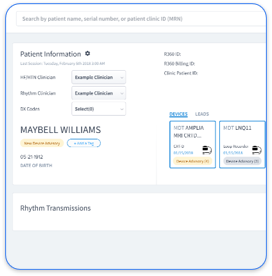
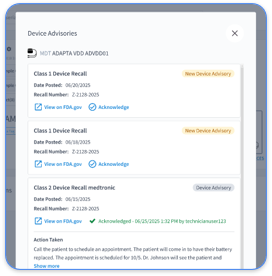
Rhythm360 delivers comprehensive CIED monitoring with more than 99.9% data transmissibility through redundant feeds, computer vision, and AI-powered extrapolation. The platform pulls data from separate OEM portals into a single dashboard, removes manual data transcription, and cuts critical alert response times by 80%.

Configuration steps include five core actions. First, complete initial platform onboarding by scheduling a demo with the Rhythm360 team. Second, set up EHR integration with Epic, Cerner, or other systems using HL7 connections. Third, configure dashboard AFib triggers such as new-onset episodes, ventricular tachycardia, and device malfunction alerts. Fourth, calibrate AI filtering to reduce false positives and focus staff attention. Fifth, deploy the mobile app so clinicians gain 24/7 access to critical alerts.
Schedule a Rhythm360 Demo Today to see vendor-neutral CIED monitoring that outperforms single-OEM solutions like PaceMate through multi-manufacturer integration and advanced AI triage.
Issue | Solution | Expected Outcome |
Poor wrist fit | Snug 24/7 wear, one finger gap | Improved sensor contact |
No baseline data | Consistent wear for 6+ days | Accurate rhythm detection |
DND override failure | Enable Critical Alerts in iOS/Android | Notifications bypass silence |
OEM data silos | Rhythm360 vendor-neutral platform | Unified alert management |
Feature | Consumer Wearables | Rhythm360 RPM | Clinical Impact |
Detection Accuracy | 84-98% with some false positives | >99.9% AI CIED | Reduced alert fatigue |
Response Time | Minutes for personal use | 80% faster clinic-wide | Improved patient outcomes |
Multi-Device Support | Single OEM | All OEMs vendor-neutral | Comprehensive coverage |
Billing Integration | None | CPT 93298 automation | Up to 300% revenue increase |
A 2026 JACC analysis of 15 clinics reports an 80% response time reduction and a 72% decrease in non-actionable alerts with AI-powered triage. Rhythm360 extends beyond AFib monitoring to heart failure and hypertension RPM, helping practices launch profitable new service lines with minimal added overhead.
The mobile application gives physicians flexibility to review critical Saturday morning AFib alerts and start anticoagulation protocols before stroke events occur. Multi-modality support includes CardioMEMS pulmonary artery monitoring and automated CPT code capture that strengthens revenue cycle management.
Schedule a Rhythm360 Demo Today to turn fragmented device monitoring into streamlined, profitable clinical workflows.
Apple Watch provides high sensitivity for AFib detection based on FDA clearance, yet motion artifacts and poor sensor contact can trigger false positives. The device supports screening rather than diagnosis, so clinicians must confirm any alerts with medical evaluation. AF History offers weekly summaries once enough data accumulates, while Irregular Rhythm Notifications provide real-time alerts for possible AFib episodes.
Rhythm360 delivers cloud-based, AI-driven triage, while many legacy on-premise systems lack modern workflow automation. The platform reaches 80% faster response times through vendor-neutral integration across all major CIED manufacturers, whereas legacy tools often support only a single OEM. Rhythm360 also adds mobile access, automated billing documentation, and deep EHR integration that older platforms typically do not provide.
The 48-hour rule describes anticoagulation requirements for AFib episodes that last longer than 48 hours before cardioversion or ablation. Episodes beyond this duration increase stroke risk because of potential clot formation in the atria. CIED monitoring platforms such as Rhythm360 track episode duration and alert clinicians as the 48-hour threshold approaches.
Most professional RPM implementations require 3 to 7 days for basic setup, including EHR integration and staff training. Rhythm360 streamlines onboarding with automated data ingestion from existing OEM portals, dashboard configuration, and mobile app rollout. Complex multi-location practices may need 2 to 3 weeks for full integration across all sites and device types.
Consumer wearables support early AFib screening but do not replace professional CIED monitoring for patients with implanted devices. Wearables cannot access intracardiac electrograms, device diagnostics, or battery status that CIEDs provide. Professional RPM platforms like Rhythm360 monitor lead impedance, pacing thresholds, and arrhythmia burden that remain invisible to consumer devices.
Effective AFib alert configuration starts with correct wearable setup for personal monitoring, yet healthcare practices need professional RPM platforms for full patient management. Heart Rhythm Society data shows a 78% reduction in AFib CIED alert triage time and a 62% decrease in daily alerts per clinician when clinics adopt vendor-neutral platforms.
Consumer devices provide initial AFib screening, while Rhythm360 scales monitoring across entire patient populations with AI triage, automated billing, and mobile clinical access. The platform shifts teams from reactive alert handling to proactive patient care, prevents strokes through faster intervention, and improves practice revenue through complete CPT code capture.
Schedule a Rhythm360 Demo Today to experience vendor-neutral CIED monitoring and see how 80% faster response times can elevate your practice’s AFib management.