Last updated: July 13, 2026
The Heart Rhythm Society's white paper on CIED data interoperability identifies a core structural problem: traditional EHRs do not manage CIED data well, and standalone OEM products rely on proprietary nomenclature, technical standards, and communication protocols that block cross-vendor data exchange. For a busy practice, this reality creates administrative overload, with staff logging into four or more portals daily, manually transcribing data into the EHR, and chasing billing documentation for complex remote monitoring codes.
Alert fatigue intensifies the burden. Each OEM portal generates its own notification stream, so clinicians face a heavy volume of non-actionable alerts mixed with critical events such as new-onset atrial fibrillation, ventricular tachycardia, or ERI/RRT indicators. Multi-signal correlation research in remote monitoring platforms shows that single-metric threshold alerts carry a false-alert rate ranging from 80% to 99%, so most notifications demand attention without reflecting true clinical deterioration. Revenue leakage follows when no centralized system tracks billable events and generates compliant documentation. Practices then miss CPT codes 93298, 93299, and 99454, which represent meaningful recurring reimbursement per patient per month.
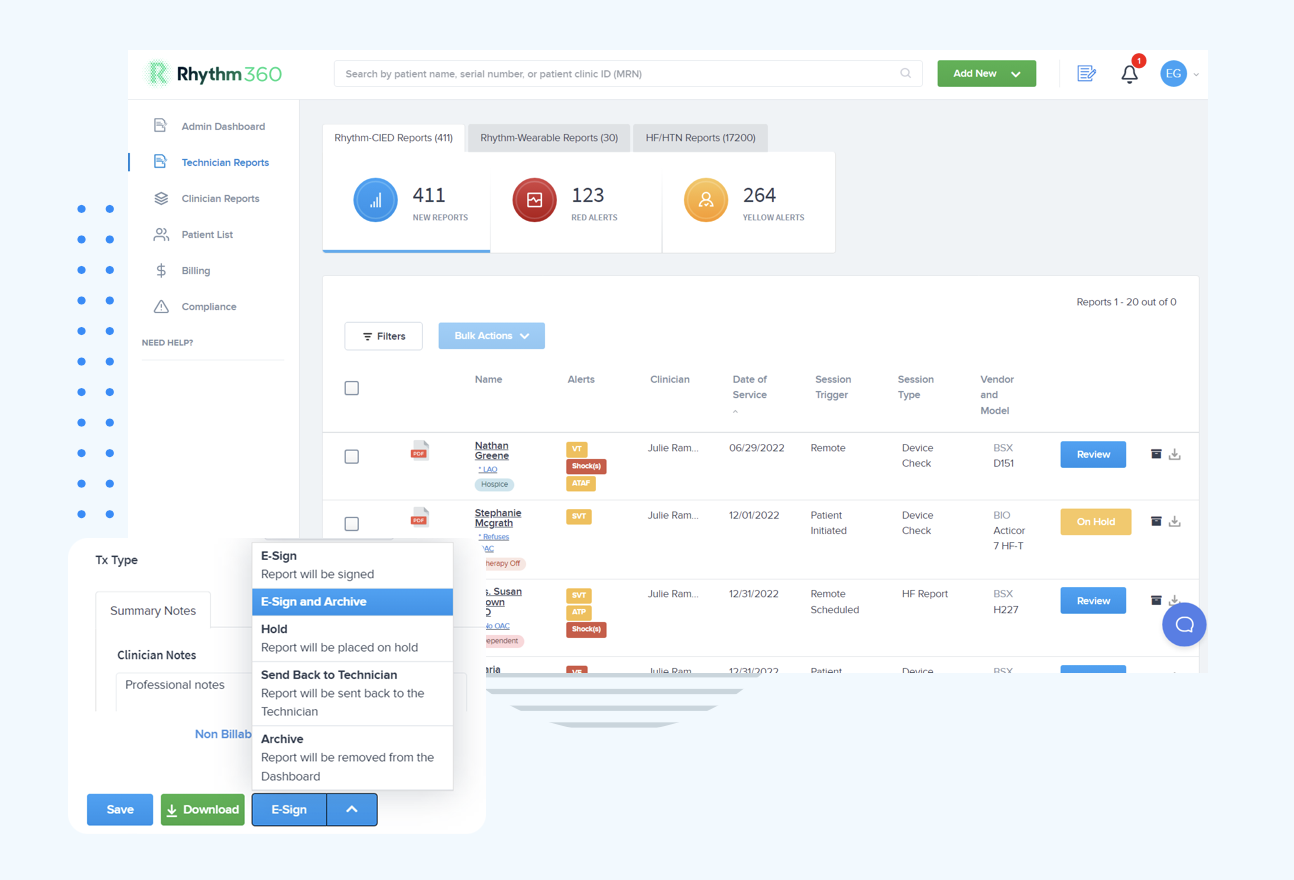
Rhythm360 by RhythmScience is a vendor-neutral, HIPAA-compliant, cloud-based platform that executes each of the 8 steps below natively. It ingests data from all major OEMs via API, HL7, XML, and PDF parsing through computer vision, achieving greater than 99.9% transmissibility through redundant data feeds. Bi-directional integration with Epic, Cerner, Athenahealth, eClinicalWorks, Greenway Health, and other systems via HL7 removes manual transcription. Automated CPT documentation supports accurate billing for the full range of CIED and RPM codes.
| Feature | How It Works | Clinical Benefit | Administrative Benefit |
|---|---|---|---|
| Vendor-Neutral Data Ingestion | API, HL7, XML, and computer-vision PDF parsing across all major OEMs | Single dashboard view of entire device population | Removes redundant portal logins and manual transcription |
| Bi-Directional EHR Integration | HL7 interfaces with Epic, Cerner, Athenahealth, and others | Accurate, real-time patient records without dual entry | Reduces documentation overhead and claim errors |
| AI-Powered Alert Triage | Multi-signal correlation engine with patient-level threshold overrides | 80% reduction in critical-alert response times | Decreases alert fatigue and staff burnout |
| Automated CPT Documentation | Tracks billable events and generates compliant reports for 93294–93299 and 99453–99457 | Supports complete, auditable clinical records | Captures previously lost billing revenue, often up to 300% increase |
| HIPAA-Compliant Mobile App | Secure review, report signing, and patient messaging from any device | Maintains continuity of care during on-call and weekend coverage | Reduces dependence on workstation-tethered workflows |
| Optional 24/7 CCT Oversight | Certified cardiac technicians supervised by physicians provide around-the-clock triage | Prevents missed critical events outside business hours | Extends monitoring capacity without adding FTEs |
Schedule a demo to see how Rhythm360 consolidates your device population into one actionable work queue.
Start with a complete inventory of every implanted device in your active patient panel, organized by OEM, device type (pacemaker, ICD, CRT, ILR, CCM, CardioMEMS), and current transmission portal. Cross-reference this list with your EHR to find patients who lack active remote monitoring enrollment. Document which OEM portals your staff access, how often they log in, and which staff members hold credentials. This audit establishes the baseline for all later configuration decisions and reveals the full scope of data fragmentation.
A vendor-neutral aggregation layer sits between OEM portals and your EHR and converts proprietary data formats into a single, queryable dataset. The HRS interoperability white paper notes that CIEDs from different manufacturers use proprietary nomenclature and communication protocols, so middleware normalization becomes a prerequisite for any unified workflow. Evaluate platforms on transmissibility rates, OEM coverage breadth, EHR integration depth, and HIPAA compliance posture. The right fit depends on your practice's OEM mix, EHR environment, and clinical workflow requirements. Once you select your aggregation platform, the next critical task is building the technical bridge between that platform and your EHR, which relies on standardized interface protocols.
The IHE IDCO (Implantable Device Cardiac Observation) profile defines the standard for transferring interrogated implantable cardiac device data to an information management system and holds Final Text status. Alongside IDCO, the IHE ACM (Alert Communication Management) profile governs how alerts route with the correct priority to the correct individuals. HL7 FHIR R4 and R5 support device interoperability through core resources including Device, Observation, DiagnosticReport, and Endpoint, which enables bi-directional data flow between the aggregation layer and the EHR.
Pro Tips
- Map every OEM data field to a corresponding FHIR Observation resource before go-live to prevent null values in the EHR.
- Use the Device-to-Gateway-to-EHR architecture, where an integration engine translates proprietary protocols into HL7 v2 or FHIR messages, so your field mapping works consistently across vendors.
- Validate bi-directional write-back after mapping and architecture setup by confirming that a signed report in the aggregation platform updates the corresponding EHR encounter within your defined SLA window.
Common Mistakes
- Configuring one-way data push without confirming EHR write-back, which leaves clinicians with split records.
- Skipping patient identity reconciliation across OEM portals and the EHR, which creates duplicate records and missed transmissions.
- Failing to test interface behavior when an OEM server is temporarily offline, so redundant feed failover remains unproven before go-live.
Step 4: Create a Single Clinical Work Queue with Role-Based Access
After data flows into the aggregation layer, configure a unified work queue that surfaces all pending transmissions, alerts, and unsigned reports in one view. Assign role-based access so CCTs see the full triage queue, physicians see prioritized escalations and signature-ready reports, and administrators see billing-status and compliance dashboards. University of Chicago Medicine processed more than 73,000 reports annually through Rhythm360 in 2025, averaging more than 18,000 reports per quarter. That volume remains manageable only with a structured, role-differentiated work queue instead of shared portal logins.
Step 5: Apply AI Alert Triage Rules and Optional CCT Oversight
Multi-signal correlation engines that detect compound decompensation events, such as rising weight combined with falling SpO₂ and declining activity, across clinically relevant time windows address the high false-alert rates discussed earlier by evaluating multiple signals together. This approach reduces noise while preserving detection of true deterioration. Configure organization-wide default rules as a starting point, then apply patient-level threshold overrides that reflect each individual's established baseline rather than population averages.
Pro Tips
- Label every data gap explicitly as "No data received — device not transmitting" so offline device signals do not appear as clinical deterioration.
- Use a triage dashboard that converts detected risk into structured incidents with one-click clinical summary generation, an assigned clinician, and auditable status tracking (Open, In Progress, Resolved).
- Engage optional 24/7 CCT oversight for weekend and after-hours coverage so ERI/RRT alerts receive timely response without overwhelming on-call physicians with non-urgent notifications.
Common Mistakes
- Relying on single-metric threshold rules that generate high false-alert volumes and accelerate clinician fatigue.
- Using email or verbal handoff for alert escalation instead of an auditable, structured incident workflow.
- Applying population-average thresholds to patients with known chronic baselines, such as COPD patients with persistently low SpO₂.
Step 6: Automate Report Generation and CPT Code Capture
Configure the platform to auto-generate compliant reports at the close of each monitoring period and map each report type to the correct CPT code. The table below reflects current billing requirements as of 2026.
CPT Code Service Description Key Documentation Requirements 2026 Medicare Rate (National Average) 93294 Remote interrogation of pacemaker system; up to 90 days Physician or QHCP interpretation; device type and settings reviewed; report signed Refer to local MAC fee schedule 93295 Remote interrogation of ICD system; up to 90 days Physician or QHCP interpretation; therapy history reviewed; report signed Refer to local MAC fee schedule 93296 Remote interrogation technical component; pacemaker or ICD Technical monitoring performed by qualified staff or certified monitoring service; cannot be billed with 93295 professional component unless split-billing rules apply Refer to local MAC fee schedule 93298 Remote interrogation of implantable loop recorder; per 30-day period All transmissions reviewed at least once per 30-day period; billed on day 31; physician or QHCP interpretation documented Refer to local MAC fee schedule 99453 RPM device setup and patient education (one-time) Clinical staff spent ≥5 minutes educating patient on device use; patient understanding documented; limited to once per device type per year $21.71 99454 RPM device supply with data collection; per 30-day period ≥16 days of automatic transmission from FDA-cleared device; exact day count documented; patient consent on file $52.11/month 99457 RPM management; first 20 minutes clinical staff time per month ≥20 minutes of interactive communication; time log with date, duration, task, and staff credentials; live interactive communication with patient or caregiver required $51.77/month 99458 RPM management; each additional 20-minute increment Same time-log requirements as 99457; add-on to 99457 only $41.42/increment Pro Tips
- Use CPT 99445 (approximately $52.11/month) for patients with only 2–15 days of transmission in a 30-day period instead of billing 99454, which requires at least 16 days.
- Configure automated day-count tracking so the platform flags patients approaching the 16-day threshold with enough time to intervene before the billing period closes.
Common Mistakes
- Billing 99454 when a patient has fewer than 16 days of transmission is the leading denial trigger for RPM claims.
- Lumping brief check-ins into a single time note no longer satisfies audit requirements for 99457, so each interaction must be logged with date, duration, task, and staff credentials.
- Billing both 93295 and 93296 without confirming that the technical component was performed by a qualified employee or certified monitoring service rather than the OEM representative.
Step 7: Turn On Secure Mobile Review and Patient Messaging
Deploy the platform's HIPAA-compliant mobile application to all clinical users who participate in on-call coverage. Configure push notifications for critical-alert escalations so physicians receive prioritized events, not the full alert stream, on their mobile devices. Enable secure patient messaging through an integrated communication framework that logs all interactions, including phone call records, within the patient record for a complete audit trail. Andrew Beaser, MD, at University of Chicago Medicine noted: "I am more likely to sign off on these while in meetings because I can easily access them on my phone." Mobile access converts previously delayed report signatures into same-day completions, which directly supports billing cycle timelines.
Step 8: Use Performance Dashboards and Continuous-Improvement Loops
Activate administrative dashboards that surface real-time metrics across four domains: patient compliance (transmission adherence rates by OEM and device type), clinical performance (alert response times and escalation-to-resolution intervals), billing status (CPT codes captured versus potential and denial rates by code), and staff productivity (reports reviewed per CCT per session and unsigned report aging). Schedule monthly review cycles where clinical and administrative teams examine dashboard data, adjust alert triage thresholds, and update patient-level monitoring parameters. After deploying multi-signal correlation and patient-level rules, clinicians were able to review 50–100 monitored patients per triage session without manual prioritization, which offers a practical benchmark for continuous-improvement planning.
Measuring Success: Workflow, Safety, and Revenue Gains
Practices that complete this 8-step implementation see measurable outcomes across three dimensions. Critical-alert response times decrease by up to 80%, which enables same-day intervention and supports the experience described by Andrew Beaser, MD, at UCM: "We are able to address these issues earlier; rather than waiting for a 3-month visit, we can call patients in for evaluation." Staff data-retrieval hours drop as automated ingestion replaces manual portal logins and transcription. Billing outcomes improve through systematic CPT code capture and compliant documentation, and Gaurav A. Upadhyay, MD, at UCM observed: "We have improved billing and accountability for our patients after the integration". Practices report up to 300% net revenue increases through stronger code capture and the addition of RPM service lines.
Schedule a demo to review your practice's current CPT capture rate and identify specific revenue recovery opportunities with Rhythm360.
Advanced Expansion: HF and HTN RPM on the Same Infrastructure
Once the CIED workflow reaches stability, the same aggregation and triage infrastructure supports expansion into Heart Failure and Hypertension RPM service lines. Rhythm360's HF/HTN service line ingests data from connected weight scales, blood pressure cuffs, and pulmonary artery monitors such as CardioMEMS and applies the same multi-signal correlation logic to detect early decompensation. Using 99454 + 99457 + one 99458, monthly RPM reimbursement reaches approximately $140–$145. Multiples of 99458 can increase the total to about $181, and when combined with CCM codes 99490 + 99439 the total can exceed $211 per patient per month, which creates a recurring revenue stream that scales with panel size. Practices that launch HF/HTN RPM alongside CIED monitoring report the largest revenue recovery because the same clinical infrastructure serves both populations without proportional increases in staff time.
Frequently Asked Questions
How frequently must pacemakers and implantable loop recorders transmit for remote monitoring billing to apply?
Pacemaker remote monitoring under CPT 93294 covers interrogation periods of up to 90 days, so a practice can bill once per 90-day cycle when a qualifying transmission and physician interpretation occur within that window. Implantable loop recorders follow a different schedule. All transmissions must be reviewed at least once per 30-day period, and both the technical and professional components are billed only once per 30-day cycle, on day 31. Continuous monitoring of the ILR is required throughout the 30-day period, not just at the billing point. Practices should confirm current technical code designations with their local Medicare Administrative Contractor, because the ILR technical code has changed from the legacy 93298-TC designation.
Can CPT 93295 and 93296 be billed together for the same patient in the same period?
CPT 93295 covers the professional component of remote ICD interrogation, and 93296 covers the technical component. Both codes can appear for the same patient in the same period only when the technical monitoring is performed by a qualified employee of the billing practice or by a certified monitoring service contracted to the practice. If the OEM manufacturer representative performs the technical monitoring, the practice may bill only the professional component (93295). Split-billing between the professional and technical components requires clear documentation that identifies who performed each component and their qualifying credentials.
How should ERI/RRT alerts be handled when they occur on weekends or after hours?
ERI (Elective Replacement Indicator) and RRT (Recommended Replacement Time) alerts indicate that a device battery is approaching end of service and require timely clinical response to schedule generator replacement before the device reaches end of life. Practices should configure their alert triage system to classify ERI/RRT as high-priority escalations that route immediately to the on-call clinician via mobile push notification and bypass the standard CCT review queue. Optional 24/7 CCT oversight provides a structured escalation pathway so weekend alerts are triaged by a certified technician who can reach the on-call physician with a pre-summarized clinical incident rather than a raw portal notification. Documenting the time from alert receipt to clinician acknowledgment supports patient safety audits and quality improvement reporting.
What is the IHE IDCO profile and why does it matter for CIED EHR integration?
The IHE IDCO (Implantable Device Cardiac Observation) profile is a Final Text interoperability standard that defines how data from an interrogated implantable cardiac device is structured and transferred to an information management system such as an EHR or aggregation platform. It specifies the data elements, message formats, and transaction sequences that allow a receiving system to interpret device interrogation results without relying on OEM-specific proprietary formats. For practices implementing a vendor-neutral workflow, IDCO compliance in the aggregation layer ensures that data from Medtronic, Boston Scientific, Abbott, and Biotronik devices can be normalized into a common structure that the EHR can consume through standard HL7 or FHIR interfaces. Without IDCO-aligned data normalization, practices risk receiving structurally inconsistent records that require manual correction before clinical use.
How does multi-signal AI triage differ from standard single-threshold alerting in CIED monitoring?
Standard single-threshold alerting fires a notification whenever one metric crosses a predefined value, such as a heart rate above 120 bpm. This approach generates a high volume of alerts, and most do not represent true clinical deterioration because individual metrics fluctuate for benign reasons. Multi-signal AI triage correlates two or more clinically related signals within a defined time window before generating an alert. In CIED monitoring, the system evaluates whether an elevated heart rate co-occurs with a rhythm irregularity, a change in device-measured activity, or a concurrent HF sensor reading before escalation. This correlation approach has reduced false-alert rates from approximately 65% to 12% in remote monitoring environments while preserving detection of genuine deterioration events. The practical outcome is a work queue where most escalated alerts represent actionable clinical findings, which reduces the cognitive burden on CCTs and physicians reviewing transmissions.
Conclusion: Moving to One Source of Truth for CIED Data
Fragmented OEM portals reflect a workflow design problem with a defined solution rather than a fixed technology limitation. The 8-step blueprint above moves a cardiology practice from disconnected data silos to a single, AI-powered, vendor-neutral clinical work queue. The steps include auditing the device population, selecting an aggregation layer, configuring HL7/FHIR and IHE IDCO interfaces, building a role-based work queue, implementing multi-signal alert triage, automating CPT documentation, enabling mobile review, and closing the loop with performance dashboards. Practices that complete this process report 80% faster critical-alert response, 50% reductions in staff data-retrieval hours, and revenue improvements of up to 300% through systematic CPT code capture and RPM service line expansion. Rhythm360 executes every step of this process natively, from computer-vision data ingestion to automated billing documentation and HIPAA-compliant mobile access.
Schedule a demo and see how Rhythm360 turns your CIED workflow into a single source of truth for your entire device population.
Read Next