Last updated: June 28, 2026
A production-grade integration stack supports HL7 v2 messaging, FHIR RESTful APIs, XML feeds, and SFTP file transfer at the same time to handle the full range of OEM transmission formats. Deep support for HL7 v2 and FHIR plus mapping and terminology normalization, including SNOMED CT, LOINC, ICD-10, and RxNorm, prevents interoperability breakdowns across real-world systems that connect multi-vendor devices to EHRs such as Epic or Cerner. Redundant data feeds provide a critical fail-safe. When an OEM server experiences downtime, a secondary ingestion path maintains continuity and contributes to the greater-than-99.9% transmissibility that Rhythm360 achieves. Reliable delivery also depends on message tracking with correlation IDs from end to end, configurable retries and backoff, dead-letter handling, and audit trails that support recovery when device telemetry feeds connect to EHR systems. Bidirectional flow keeps both systems synchronized because updated patient demographics, medication changes, and clinical notes written in the EHR propagate back to the monitoring platform in near real time. This synchronization creates the foundation for the middleware layer that handles normalization and patient matching.
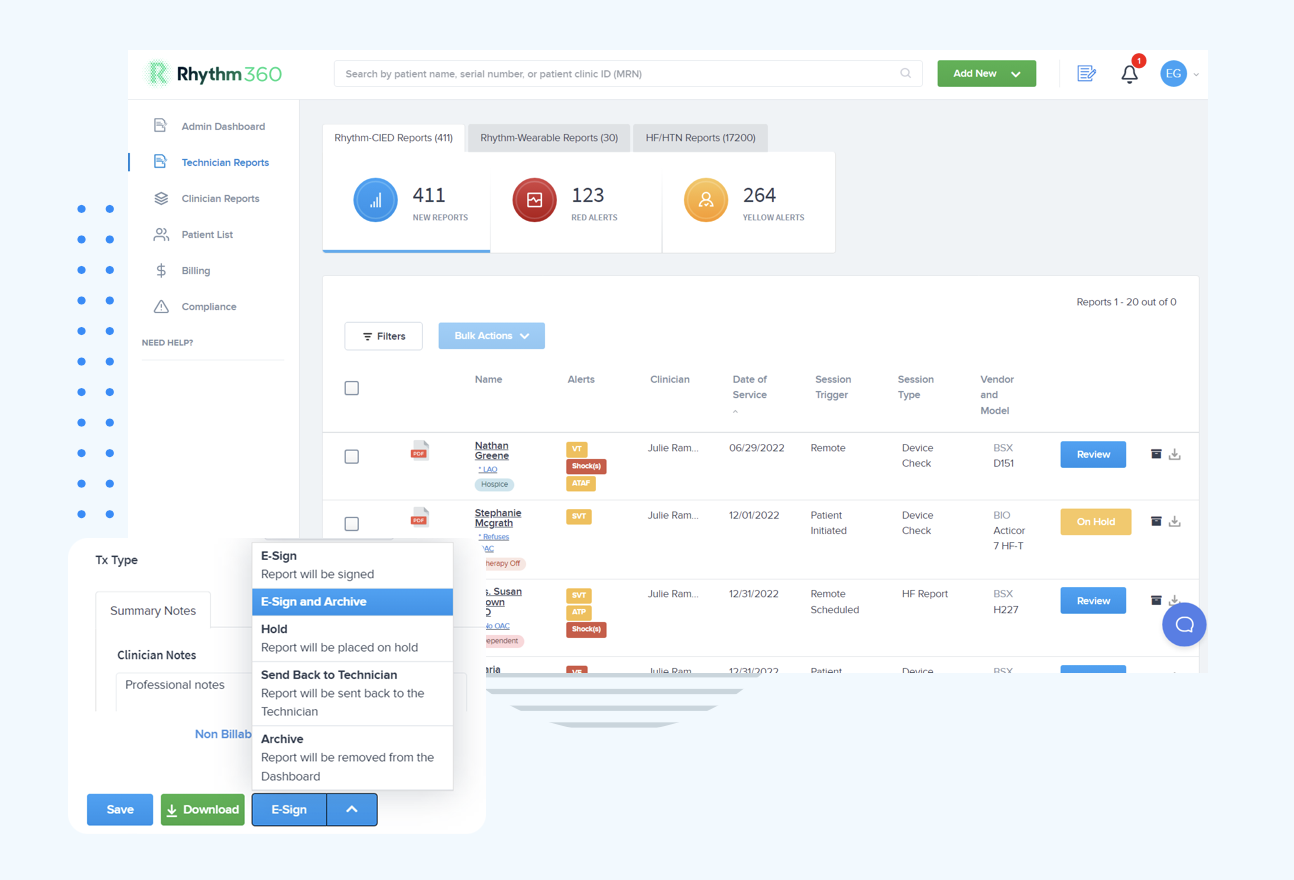
See Rhythm360's HL7 FHIR cardiac integration architecture in a live walkthrough.
Raw device transmissions arrive as PDFs, XML payloads, and proprietary API responses, which EHR systems cannot consume directly. Middleware parses each format, applies terminology normalization, and resolves patient identity before writing a record to the EHR. Integration platforms support Master Patient Index (MPI) integration, deterministic and probabilistic identity resolution, configurable thresholds, survivorship rules, manual-review queues, audit trails, and feedback loops to improve match quality and prevent duplicate charts or mismatched results when routing device data. Rhythm360 applies computer vision (OCR) to unstructured PDFs, extracts device serial numbers, implant dates, and measured parameters, then runs them through the patient-matching engine for accurate chart assignment.
| Capability | Basic HL7 Interface Engine | Generic iPaaS | Rhythm360 Vendor-Neutral Middleware |
|---|---|---|---|
| Patient Matching Method | Deterministic only | Deterministic and probabilistic with configurable thresholds | Deterministic, probabilistic, and AI-assisted with MPI integration |
| OEM Format Support | HL7 v2 only | HL7 v2, FHIR, XML, SFTP | HL7 v2, FHIR, XML, PDF (OCR), proprietary OEM APIs |
| Audit Trail | Basic message logs | Correlation IDs from end to end with dead-letter handling | Full audit trail with feedback loops and manual-review queues |
| Redundant Feed Failover | None | Configurable retry and backoff | Redundant OEM feeds with AI-powered gap extrapolation |
Alert fatigue drops when the system separates urgent events from routine noise. A rules engine that categorizes alerts by clinical severity routes only actionable events to clinicians and suppresses or batches low-priority transmissions. Decision support, including AI-assisted decision support, grows more important as data volumes increase, a reality confirmed by University of Chicago Medicine's experience with centralized remote monitoring through Rhythm360.
| Severity Tier | Clinical Examples | Response Target | Routing Action |
|---|---|---|---|
| Critical | Ventricular fibrillation, sustained VT, lead fracture, device ERI/RRT | Immediate (minutes) | Push alert to on-call EP and CCT, then initiate care coordination |
| Urgent | New-onset AFib, significant battery depletion, sensing threshold change | Same day | Notify primary cardiologist and flag for same-day review queue |
| Routine | Scheduled remote check, minor parameter drift, patient-reported symptom | Within 72 hours | Batch into daily review worklist |
| Informational | Successful transmission confirmation, device connectivity restored | No clinical action required | Log to audit trail and suppress from clinical inbox |
By filtering non-actionable noise and escalating only clinically significant events, Rhythm360's AI triage engine achieves the 80% reduction in critical-alert response time cited earlier. UCM clinicians reported the ability to review more transmissions daily and identify more abnormalities after implementing centralized data aggregation.
Epic: Rhythm360 connects through Epic's FHIR R4 APIs and HL7 v2 ADT and ORU feeds. Device interrogation results map to discrete flowsheet rows using LOINC codes. Implant data populates the Implanted Device section of the patient chart. Bidirectional write-back pushes signed reports as scanned documents or structured notes into the Epic chart and can trigger SmartText generation for billing documentation. To map CIED data to Epic, the integration team configures an HL7 ORU message template that maps device serial number to the Equipment field, measured parameters to discrete observation identifiers, and alert status to the Result Status segment.
Cerner: Integration uses Cerner's Millennium HL7 v2.5.1 interface with FHIR DSTU2 or R4 overlays where available. Device data lands in the Results Organizer. Alert notifications trigger CareAware event rules that route to the appropriate care team inbox for timely review.
Athenahealth: Rhythm360 connects through Athenahealth's REST API and HL7 feed. Completed device reports attach as clinical documents. CPT codes and associated ICD-10 diagnoses pre-populate the encounter for provider review and sign-off, which reduces manual charge entry to a single confirmation click.
Remote monitoring revenue depends on meeting precise documentation thresholds and capturing them consistently. CPT 99453 covers device setup and patient education. CPT 99454 requires 16 or more days of data collection per 30-day period. CPT 99457 and 99458 bill for 20 and each additional 20 minutes of interactive communication and clinical review. CPT 93298 covers physician interpretation of CIED data with a written report. Rhythm360 tracks each threshold automatically, flags encounters that have met billing criteria, and generates compliant documentation that satisfies payer requirements without manual chart review. “We have improved billing and accountability for our patients after the integration,” reflects the direct financial impact of automated CPT capture. Practices implementing Rhythm360 have achieved up to a 300% increase in revenue through optimized CPT code capture, improved staff efficiency, and the addition of RPM service lines for heart failure and hypertension management.
Strong security and compliance controls protect patient data and keep integrations audit-ready. Before any data flows, execute a Business Associate Agreement (BAA) with every integration vendor and subprocessor so the legal framework supports the technical safeguards. After BAAs are in place, enforce AES-256 encryption for data at rest and TLS 1.2 or higher for data in transit across all device-to-platform and platform-to-EHR connections. Layer access controls on top of encryption by implementing role-based access controls (RBAC) with multi-factor authentication for all clinical and administrative users.
Maintain audit trails with correlation IDs from end to end that cover every data ingestion, transformation, alert, and user action to satisfy HIPAA audit requirements. Confirm 21st Century Cures Act information-blocking compliance by keeping patient data accessible through certified FHIR APIs without unnecessary restriction. Conduct annual HIPAA Security Risk Assessments and penetration tests that include all integration endpoints. Establish data retention and destruction policies aligned with state and federal requirements for cardiac monitoring records.
Fragmented OEM portals, manual alert workflows, and disconnected billing processes cannot keep pace as CIED populations grow and data volumes scale. University of Chicago Medicine's experience with a unified remote monitoring platform shows that centralized, vendor-neutral integration works at enterprise scale. Rhythm360 delivers the bidirectional data architecture, AI-powered alert triage, accurate patient matching, and automated CPT capture that cardiology practices, EP clinics, and integrated health systems need to achieve the response-time and revenue improvements documented throughout this guide without adding staff. See how Rhythm360 unifies your cardiac telemetry monitoring devices with your EHR and RPM platforms in a personalized demo.
Vendor-neutral integration means a platform can ingest, normalize, and act on data from any cardiac device manufacturer, including Medtronic, Boston Scientific, Abbott, Biotronik, and others, without a separate portal login or custom build for each OEM. This capability matters because most cardiology practices implant devices from multiple manufacturers. Without vendor neutrality, staff log into four or more disconnected portals daily, reconcile conflicting data formats manually, and risk missing critical alerts that fall through the gaps between systems. A vendor-neutral platform like Rhythm360 consolidates all device data into a single dashboard, removes administrative redundancy, and creates a unified source of truth for clinical decision-making and billing documentation.
Rhythm360 uses a layered patient-matching approach that combines deterministic matching, which relies on exact matches for fields such as device serial number, date of birth, and medical record number, with probabilistic matching that scores partial matches across multiple demographic attributes. The platform integrates with the health system's Master Patient Index (MPI) to cross-reference existing records and applies configurable survivorship rules to decide which data element takes precedence when conflicts appear. Any transmission that falls below the confidence threshold routes to a manual-review queue with a full audit trail so no device record is silently misassigned to the wrong patient chart. Feedback from resolved manual reviews continuously improves the matching model over time.
The primary CPT codes for remote cardiac monitoring fall into two categories. Remote physiologic monitoring codes 99453, 99454, 99457, and 99458 apply to RPM services including heart failure and hypertension monitoring. CPT 99453 covers device setup and patient education. CPT 99454 covers device supply with daily recording, billed per 30-day period that requires 16 or more days of data. CPT 99457 covers the first 20 minutes of clinical staff time and interactive communication, and CPT 99458 covers each additional 20 minutes. Cardiac device monitoring code 93298 covers physician interpretation of CIED data with a written report. Rhythm360 tracks the specific time and data thresholds for each code automatically, generates compliant documentation at the point of threshold completion, and pre-populates the encounter with the appropriate CPT and ICD-10 codes for provider review. This automation removes the manual chart auditing that causes most billing leakage in cardiac monitoring programs.
The full integration process, from initial discovery through go-live, typically takes a few days to a few weeks, depending on EHR complexity, the number of OEM device populations, and the health system's IT governance requirements. Simple single-EHR deployments with a standard HL7 interface can be operational within one to two weeks. Larger health systems with multiple EHR instances, complex patient-matching requirements, or custom FHIR API configurations may require three to four weeks. Rhythm360's implementation team manages the interface build, patient-matching configuration, alert rules setup, and billing automation activation, which reduces the burden on internal IT staff throughout the process.
Rhythm360's rules engine categorizes every incoming transmission into four severity tiers: critical, urgent, routine, and informational. Clinical parameters defined with the practice's electrophysiologists and cardiologists drive these tiers. Critical events such as ventricular fibrillation, sustained ventricular tachycardia, lead fracture, and device end-of-life indicators trigger immediate push notifications to the on-call clinician and, when applicable, to Rhythm360's 24/7 certified cardiac technician (CCT) oversight team. Informational transmissions such as successful connectivity confirmations are logged to the audit trail but never appear in the clinical inbox. Clinicians see only alerts that require a decision, which reduces the cognitive load that causes true critical events to be overlooked in high-volume environments. The platform's redundant data feeds and greater-than-99.9% transmissibility keep the underlying data that drives these triage decisions complete and accurate.