This table summarizes the typical infrastructure components used to deploy Paceart Optima on-premise. Because support responsibilities have transitioned to PaceMate, administrators should verify all current specifications directly with PaceMate before any hardware procurement or upgrade decisions.
| Component | Supported Specification | Notes |
|---|---|---|
| Server OS | Windows Server | On-premise deployment only, no native cloud hosting. Verify current supported versions with PaceMate. |
| Database | Microsoft SQL Server | Dedicated or shared SQL instance, requires DBA oversight. Verify current supported versions with PaceMate. |
| Web Server | IIS | Manual configuration required for SSL/TLS hardening. Verify current version with PaceMate. |
| .NET Framework | .NET Framework | Verify current version with PaceMate. |
| Client Workstation | Windows 10/11, supported browser for web client | Thick-client or browser-based access, no native mobile app. |
| Network | LAN/VPN required for remote access, static IP recommended for server | VPN introduces latency and IT overhead for remote clinicians. |
| Security | Active Directory integration, manual patch management, local PHI encryption | No zero-trust framework, manual audit log review. |
Note: Confirm all current requirements with PaceMate for any 2026 procurement decision.
SQL Server functions as the persistence layer for all Paceart Optima patient records, device interrogation data, and audit logs. Administrators should verify currently supported SQL Server versions directly with PaceMate.
Database administrators maintaining a Paceart environment must plan for recurring cost and risk factors. These include SQL Server licensing at the appropriate tier, annual Software Assurance renewals, manual backup and recovery configuration, and index maintenance routines. Each SQL Server version upgrade also requires regression testing against the Paceart application layer. That testing cycle can take weeks and demands dedicated DBA time. Interface connections to external systems are frequently charged separately at $1,000–$5,000 per interface plus $50–$200 per month in ongoing fees, a cost structure that applies directly to any HL7 or database-level integration built on top of a Paceart SQL backend.
Paceart Optima uses a classic three-tier client, application, and database model. The presentation tier consists of workstation clients or a browser-based interface. The application tier runs on IIS with .NET Framework business logic. The data tier is a SQL Server instance that stores all structured CIED records. Each tier requires separate maintenance, patching, and version management.
This architecture reflects standard enterprise software design from the early 2000s. Its on-premise nature means all compute, storage, and network resources are provisioned locally. On-premise infrastructure requires organizations to provision for peak load, leaving expensive infrastructure idle most of the time and increasing waste as on-premise environments carry full capacity as overhead even when demand drops. For a cardiology practice, this pattern translates to server hardware that sits underutilized outside of peak transmission windows while still accruing power, cooling, and maintenance costs.
Traditional local on-premise systems face scalability limitations, slower update cycles, and reduced interoperability compared with cloud-native platforms that support controlled, secure, and traceable updates aligned with regulatory documentation. Adding a new device manufacturer to a Paceart deployment requires manual configuration work. A cloud-native platform can instead support API-enabled onboarding flows that shorten timelines and reduce IT effort.
Paceart Optima’s integration capabilities are constrained by its .NET and SQL architecture and its reliance on HL7 v2 messaging. HL7 v2 is an aging standard that lacks the bidirectional, real-time data exchange that modern EHRs such as Epic and Cerner support through FHIR R4 APIs. Outbound HL7 feeds from Paceart typically require custom interface engines, manual mapping tables, and ongoing maintenance as EHR versions update. Each interface introduces its own cost and potential failure point.
Remote access to Paceart depends on a VPN connection back to the on-premise server. The platform does not provide a native mobile application. Clinicians on call must connect through a VPN client on a laptop or rely on a remote desktop session. Both options introduce latency, authentication friction, and security exposure. Cloud-connected remote monitoring platforms support continuous transmission of patient data from home-based devices to secure cloud dashboards, enabling real-time arrhythmia detection and early intervention. Paceart’s architecture cannot match this capability without significant third-party infrastructure layered on top.
| Dimension | Paceart Optima (On-Premise) | Rhythm360 (Cloud-Native) |
|---|---|---|
| Architecture | 3-tier .NET, SQL, IIS, local server deployment, manual patching | Cloud-hosted SaaS, microservices, automatic updates with no downtime |
| Scalability | Fixed hardware capacity, peak-load provisioning required, hardware refresh cycles typically run three to five years | Elastic compute scales with patient volume, no hardware procurement cycle |
| EHR Integration | Outbound HL7 v2 via custom interface engines, per-interface fees, manual mapping | Bi-directional integration with Epic, Cerner, Athenahealth, eClinicalWorks via HL7 and API, onboarding in days to weeks |
| Remote Access | VPN-dependent, no mobile app, remote desktop required for off-site access | HIPAA-compliant mobile app, browser-based access from any device, no VPN required |
| Vendor Neutrality | Medtronic-origin system, multi-vendor data requires manual portal reconciliation | Ingests data from Medtronic, Boston Scientific, Abbott, Biotronik, and others into a single dashboard, >99.9% transmissibility via AI and redundant data feeds |
| Security Model | Manual patch management, Active Directory, local PHI encryption, no zero-trust framework | Encryption at rest and in transit, role-based access control, audit logging, zero-trust security aligned with HIPAA |
Ready to see these differences in action? Request a live walkthrough of Rhythm360’s vendor-neutral platform tailored to your device mix and EHR environment.
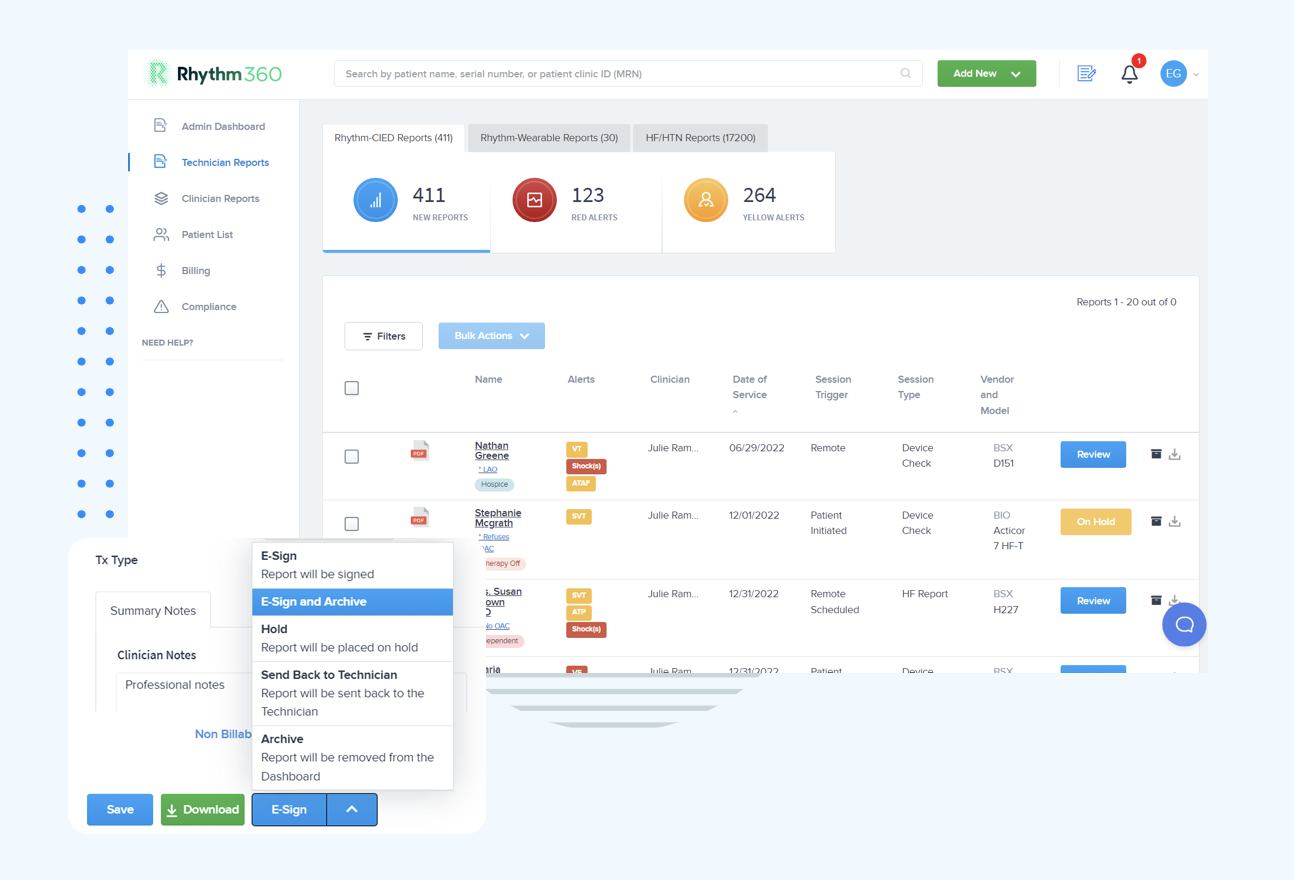
Migrating from Paceart Optima to a cloud platform involves four primary cost and effort categories: data extraction, interface decommissioning, staff retraining, and transition-period productivity loss.
Data extraction from a SQL Server backend requires scripting, validation, and format normalization before records can be imported into a new system. Data migration from legacy on-premise systems ranges from $2,000–$15,000 or more depending on record volume, data formats, and interface complexity. Legacy interface decommissioning adds further cost beyond the per-interface fees discussed earlier. Each HL7 connection must be tested, redirected, and retired without disrupting active patient monitoring.
On the infrastructure side, a US-based healthcare organization eliminated $150,000–$300,000 in on-premise hardware refresh costs within 10 weeks of migrating a revenue-critical system to cloud infrastructure, achieving 99.9%+ availability from day one and reducing disaster recovery time from up to 8 hours to under 15 minutes. The peak-load provisioning problem described earlier translates directly to migration ROI. Eliminating idle server capacity removes ongoing power, cooling, and maintenance costs that cloud subscriptions avoid entirely.
Over a five-year horizon, cloud systems incur materially lower total cost of ownership than on-premise systems once IT labor and hidden operational costs are included, with one solo practice example showing cloud at $55,500 versus on-premise at $81,500 over five years. For cardiology practices, the gap widens further when factoring in SQL Server licensing, IIS maintenance, and the DBA hours required to manage Paceart’s database tier. Institutions using legacy IT systems spend approximately 60–80% of their IT budget on simply maintaining them.
Practices that underestimate server maintenance complexity frequently encounter unplanned downtime during SQL Server patch cycles or Windows Server updates. Each update requires Paceart application-layer regression testing. Alert fatigue is a second common failure mode. Without AI-driven triage, high transmission volumes generate non-actionable notifications that desensitize clinical staff to genuine critical events. Revenue leakage compounds both problems. Each step of manual data entry carries a minimum 1% risk of human error, with the risk compounding across multiple steps in fragmented legacy systems. That error risk directly affects CPT code documentation accuracy for codes such as 93298, 93299, and 99454.
Measurable success metrics for a platform migration include critical alert response time, with a target of roughly 80% reduction, staff hours per week spent on data retrieval and manual entry, claim acceptance rate for remote monitoring CPT codes, and patient transmission compliance rate across the full CIED population.
Following the PaceMate acquisition of the Paceart Optima system, administrators should contact PaceMate directly to confirm the current supported SQL Server versions, because Medtronic is no longer the primary support contact for the product. Older SQL Server versions that have reached end of support from Microsoft no longer receive security patches.
Paceart Optima does not offer a native mobile application. Remote access requires a VPN connection to the on-premise server, typically followed by a remote desktop session or browser-based client access over that VPN tunnel. This architecture introduces latency, requires IT-managed VPN credentials for each remote user, and creates a single point of failure if the VPN or server becomes unavailable. Clinicians who need to review transmissions or respond to alerts outside the clinic are operationally constrained by this dependency. Cloud-native platforms like Rhythm360 eliminate this constraint through HIPAA-compliant mobile applications and browser-based access that require no VPN infrastructure.
PaceMate acquired the Paceart Optima system from Medtronic, consolidating cardiac data management capabilities under PaceMate’s ownership. As a result, Medtronic is no longer the primary support, update, or security bulletin contact for Paceart Optima. Practices with active Paceart deployments should establish a direct support relationship with PaceMate to understand the current version roadmap, security patch cadence, and long-term product support commitments. The transition also raises vendor dependency considerations. Practices relying on a system whose ownership has changed should evaluate whether the new owner’s roadmap aligns with their three-to-five-year infrastructure plans.
Migration timelines vary based on patient record volume, the number of active HL7 interfaces connected to the Paceart SQL database, and the complexity of the destination platform’s onboarding process. Data extraction and validation from a SQL Server backend, interface decommissioning, staff training, and a parallel-run period can collectively extend a migration to six months or longer for larger practices. Rhythm360’s implementation process, including EHR integration setup, is designed to complete in a few days to a few weeks for most practice sizes. A structured onboarding workflow minimizes parallel-run duration and associated productivity loss.
Paceart Optima’s three-tier on-premise architecture was built for a different era of cardiac device management. In 2026, that architecture carries compounding risks that include aging SQL Server and Windows Server dependencies, no native mobile access, manual PHI security management, HL7-only integration friction, and a support structure that has changed hands following the PaceMate acquisition. The total cost of maintaining this infrastructure, once server hardware, SQL licensing, DBA hours, and integration maintenance are fully accounted for, consistently exceeds the cost of a modern cloud subscription over a five-year horizon.
Rhythm360 provides a vendor-neutral, AI-powered, HIPAA-compliant alternative that consolidates all CIED and RPM data into a single cloud platform. It integrates bidirectionally with Epic, Cerner, Athenahealth, and others, and it gives clinicians mobile access to critical alerts from anywhere. Practices that have made the transition report an 80% reduction in critical alert response times and up to a 300% increase in revenue through improved CPT code capture.
Evaluate Rhythm360 as your Paceart upgrade path and reduce the operational, compliance, and financial risks you carry today by requesting a consultation with our team.