After Medtronic transferred Paceart, PaceMate took over all day-to-day technical support. Use the contacts below for system issues, login problems, and general troubleshooting.
| Contact Type | Details | Availability |
|---|---|---|
| Phone (Paceart support) | Contact PaceMate | Business hours |
| Email (Paceart support) | Contact PaceMate | Business hours |
| Upgrade escalation (Medtronic) | Contact Medtronic | Business hours |
Route urgent upgrade or migration questions that fall outside PaceMate’s scope to Medtronic. Send all other Paceart Optima support issues, including connectivity errors, database access problems, and report generation failures, directly to PaceMate.
PaceMate (the company) acquired Medtronic's Paceart Optima system in 2024 and offers data migration to its PaceMateLIVE platform while the on-premises PaceArt product continues.
Practices that do not depend on SessionSync™ integration, especially those managing multi-vendor device populations, can evaluate vendor-neutral alternatives based on clinical outcomes and operational performance.
Practices report three recurring operational pain points that drive most support calls and workflow inefficiencies.
Data fragmentation. Paceart stores data locally, so staff still log into separate OEM portals (Medtronic CareLink, Boston Scientific Latitude, Abbott Merlin.net, Biotronik Home Monitoring) to retrieve transmissions from non-Medtronic devices. Workaround: assign a dedicated technician per portal and use a shared spreadsheet to track pending reviews. This approach is labor-intensive and does not scale as device volume grows.
Alert delays. On-premise architecture limits alert visibility to times when staff sit at the workstation or connect through VPN. After-hours and weekend events often sit unreviewed until the next business day. Workaround: configure email forwarding from each OEM portal. This floods inboxes and still provides no centralized triage.
Billing documentation gaps. Staff manually cross-reference transmission logs against billing requirements. Workaround: build a manual audit checklist and apply it to each encounter. This method only works when teams have enough time and consistency, which rarely happens under high patient volumes.
The workarounds above function as temporary fixes, not long-term solutions. When data fragmentation, alert delays, and billing gaps compound across a growing device population, three operational pressures often make migration the only sustainable path forward.
Administrative overload. A practice that implants devices from two or more OEMs immediately inherits multiple non-interoperable portals. Each portal uses its own login, alert format, and report structure. Device technicians spend a large share of their day on data retrieval instead of clinical review, which contributes directly to burnout and turnover.
Missed critical events. Manual processes and on-premise access constraints create windows where a ventricular tachycardia episode, new-onset AFib, or lead malfunction goes unreviewed for hours. Cardiac monitoring literature documents the clinical and liability risk of missed weekend or after-hours alerts.
Financial leakage. Without automated tracking of billable remote monitoring periods, practices frequently under-bill or fail to bill for CPT codes tied to device checks and physiological monitoring. Revenue lost to incomplete documentation compounds month after month.
This comparison highlights how Paceart’s on-premise architecture differs from modern cloud-based, vendor-neutral platforms. Rhythm360 figures come from platform specifications and documented client outcomes.
| Attribute | Paceart (On-Premise) | Modern Cloud Platform (e.g., Rhythm360) |
|---|---|---|
| Data transmissibility | Dependent on local server uptime and VPN access, no published redundancy rate | >99.9% via redundant data feeds, AI extrapolation, and computer vision |
| Alert triage | Manual review, no AI filtering, alerts visible only at workstation | AI-powered triage prioritizes clinically significant events, mobile access 24/7 |
| EHR integration | Limited native bi-directional EHR integration | Bi-directional integration with Epic, Cerner, Athenahealth, eClinicalWorks, and others via HL7 |
| CPT code documentation | Manual | Automated CPT capture and documentation, supports substantial revenue recovery |
| Vendor coverage | Paceart Optima supports multiple OEMs (Biotronik, Boston Scientific, ELA, Medtronic, St. Jude Medical, Vitatron) directly in one system | Vendor-neutral coverage for Medtronic, Boston Scientific, Abbott, Biotronik, and others in one dashboard |
| Mobile access | Requires VPN to on-premise server | HIPAA-compliant mobile app for transmission review, report signing, and care coordination |
Rhythm360 is a vendor-neutral, HIPAA-compliant cloud platform built for practices that manage multi-vendor CIED populations. It ingests data from all major OEMs via API, HL7, XML, and PDF parsing through computer vision. The platform then normalizes these disparate data streams into a single dashboard, so staff can eliminate redundant logins.
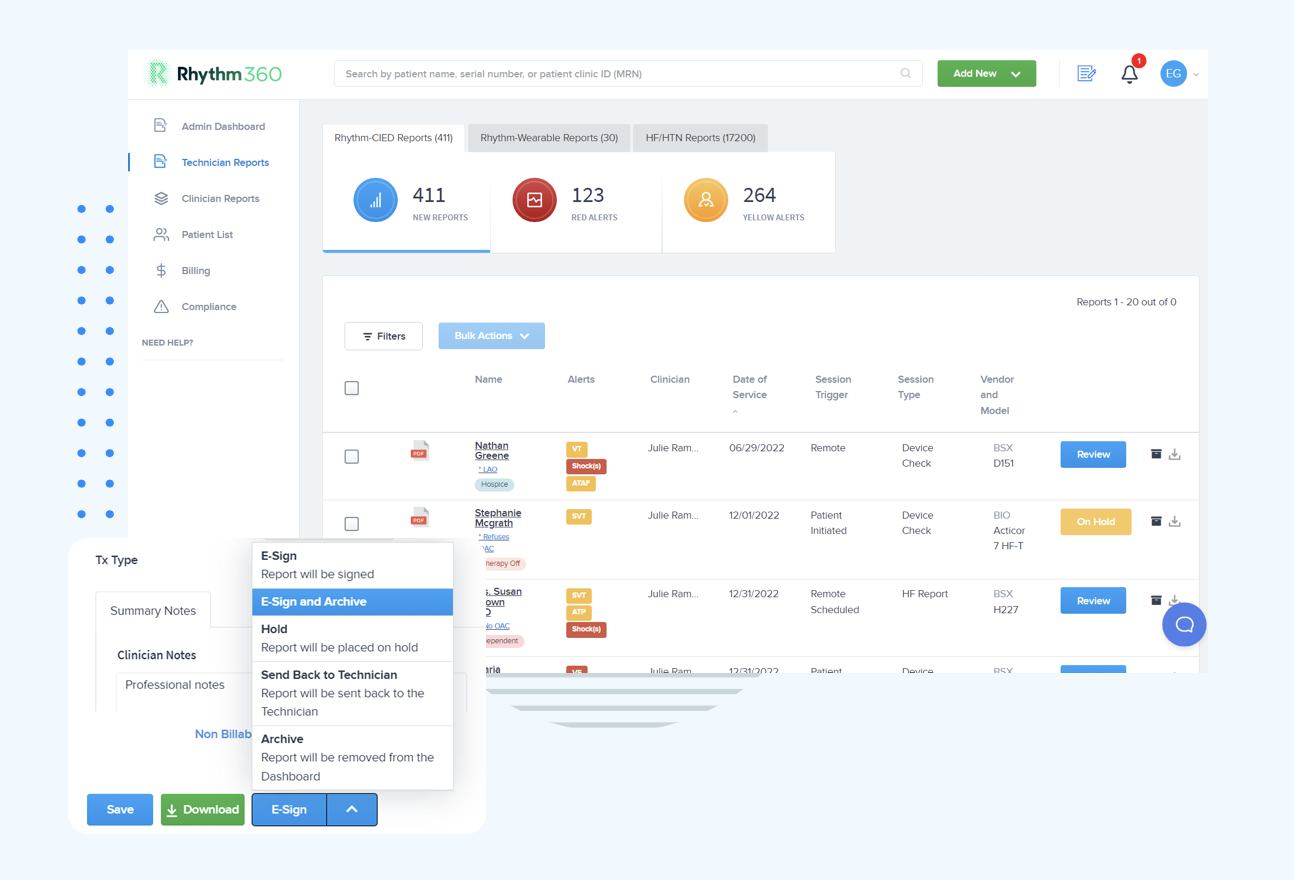
For practices that ask what alternative replaces Paceart, Rhythm360 provides an operationally complete option. It replaces fragmented portal workflows, automates billing documentation, and delivers AI-powered alert triage that achieves the response-time improvements outlined in the key takeaways. Practices that have implemented the platform report significant revenue gains through improved CPT code capture and the addition of RPM service lines for heart failure and hypertension patients.
PaceMate remains the logical migration path for practices that depend on SessionSync™. Rhythm360 fits practices that prioritize multi-vendor consolidation, automated billing, and clinical workflow automation across their entire device population.
Find out how much revenue your practice is leaving on the table — request a billing impact analysis.
Rhythm360 onboarding and EHR integration usually take a few days to a few weeks, depending on practice size and EHR complexity. This timeline is significantly faster than typical legacy on-premise deployments. The platform is HIPAA-compliant by design and maintains full audit trails on all patient communications and clinical actions.
The HIPAA-compliant mobile application gives clinicians secure access to transmissions and reports from any location. This access closes the on-call coverage gaps that workstation-bound systems create. Pricing follows a SaaS model that scales with clinic size and platform usage, which removes large upfront infrastructure costs.
PaceMate manages all Paceart Optima support for system issues and troubleshooting. For upgrade-related escalations, contact Medtronic directly through your existing representative or support channel.
PaceMate acquired the system in 2024, as detailed in the ownership section above. Practices that do not rely on SessionSync™ can evaluate any vendor-neutral platform as their migration destination.
For practices that manage devices from multiple OEMs, a vendor-neutral cloud platform offers the most operationally sound alternative. Rhythm360 consolidates all CIED data into a single dashboard, automates CPT code documentation, integrates bi-directionally with major EHR systems, and provides AI-powered alert triage accessible via mobile. Practices that do not require SessionSync™ continuity benefit most from this approach because it removes the multi-portal fragmentation that Paceart’s on-premise architecture cannot resolve.
A structured migration from Paceart to Rhythm360 can take 8 weeks, as demonstrated by Duly Health and Care's migration of over 6,000 patients. Smaller practices with straightforward EHR environments can complete onboarding and integration in several days. The main variables include the volume of historical patient records that require transfer and the complexity of existing EHR integrations.
Practices that use Paceart handle billing documentation manually. Migrating to Rhythm360 introduces automated tracking and documentation for remote monitoring CPT codes. Practices that have made this transition capture the revenue gains described earlier by closing manual documentation gaps that often cause missed billable events and claim rejections.
Paceart served as an organizational tool for single-vendor Medtronic practices. Its on-premise architecture, lack of AI triage, and manual billing workflows now create direct liabilities for practices that manage multi-vendor device populations. PaceMate offers a valid migration path for practices that need SessionSync™ continuity. For other practices, a vendor-neutral cloud platform provides a clearer operational path with one login, automated CPT capture, AI-filtered alerts, and mobile access that closes after-hours coverage gaps.
Rhythm360 replaces what Paceart cannot deliver by providing a unified, intelligent, and scalable platform that improves response times and recovers revenue that manual workflows often miss.